TL;DR callback, delegate and promise
We use asynchronous request to get data somewhere on Internet. A single request is very easy to handle.
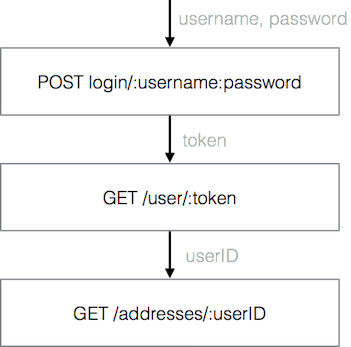
Here comes the tough time, dealing with multiple async requests. Especially, when they have dependency between each other like this.

In this article, I will show the ways to perform http request chaining in iOS. I will use the GetAddressesOperation as an example. This operation has three subtasks as shown below.
Callback
// 1. login post request
NSURLSession.sharedSession().dataTaskWithRequest(loginRequest){ data , res , err in
    // let token = data...
    // we have token.
    let getCurrentUserURL = NSURL(string: getUserDataURL + "?token=\(token)")!

    // 2. get current user data
    NSURLSession.sharedSession().dataTaskWithURL(getCurrentUserURL){ data , res , err in

        // we have user data, and we get currentUserID
        let _getAddressesesURL = NSURL(string: getAddressesURL + "?token=\(token)&userId=\(currentUserID)")!

        // 3. get last friend user data
        NSURLSession.sharedSession().dataTaskWithURL(_getAddressesesURL){ data , res , err in

            // we have addresses. we're done
            println("done")

        }.resume()
    }.resume()
}.resume()
Callback function is a classic pattern in async. Invoke NSURLSessionTask, after the task is finished, the completion block will be called. At this point, we have the result, then we call the next request in the chain.
Horrible code makes you mad, It is hurting your eyes. Whenever you read this code, you’re stacking your thought like pyramid. This push-to-right code is called Pyramid of doom, or spaghetti code.
Besides ugliness, the code leads to bug. Consider variable scope, when you write the deepest last request, you may accidentally use variable from outer scope and break encapsulations, causing logic errors at worst.
I have no problem with three requests, but real world is so cruel. It’s not just three. If the backend guy insists on giving an easy API. You might have to deal with a horde.

Delegate
Unless we specify a completion block, NSURLSession will call delegate function instead. ( See full code at Gist. )
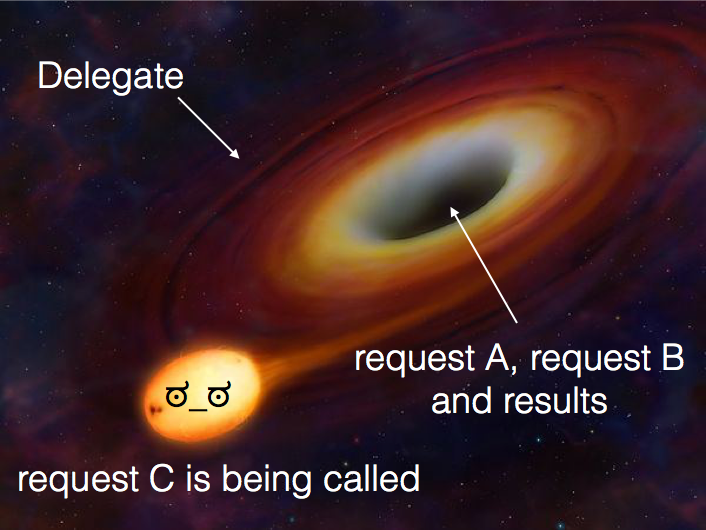
It looks like a black hole. You manage everything inside a delegate function, including, order requests, concatenate data, handle error and parse result. For all requests in one place, Ah that’s a lot. (@_@)
Delegate pattern flattens async blocks, and It’s too flat! It leaves code flow in imagination. Unless I comment the code, it looks unclear what the order that I am now.
Variable scope puzzlement. Variables are all in the same place, you might mess up something unintentionally, and that raise debug/test difficulty +10 levels.
However, in case I really need to do something advance such as, tracking progress, dealing with background, handling auth challenge, working with stream, etc. Delegate would be my first choice.
Promise
Despite the previous two iOS citizens, Promise is a pattern from else where. It has been developing as a core feature in many languages. However, Swift hasn’t got one.
Fortunately, we don’t have to reinvent the wheel. Thanks to PromiseKit, an astounding lib that I will be using to defeat this async boss.
Here’s the code that use Promise pattern.
firstly{
    self.getToken()
}
.then{ token in
    self.getUserData(token: token)
}
.then{ userData in
    self.getAddresses(userID: userID)
}
.then{ addresses in
    println("done")
}
.catch{ error in
    println(error)
}
Promise eliminates spaghetti code, breaks indentations, refactors code in synchronous manner. The code looks cleaner, and more readable. You can try to read code to your friends, and they will suddenly know what you have done.
Chaining async is very easy in Promise. We specify then handler at the end of Promise, any subsequent then will wait on the previous promise’s resolution before continuing.
Error handling is the most thing I like. When any Promise thrown an error, the chain will stop, and this is your chance to catch an error.
We create an async task with Promise<T>. This type tells us that it might produce T of a given future fulfill, or throw an error reject.
func getUserData(#token: String) -> Promise<User>{
    return Promise<User>{ fulfill, reject in
        let task = NSURLSession.sharedSession().dataTaskWithURL(self.getCurrentUserURL){ data , res , err in
            if let err = err{
                return reject(err)
            }
            let user = User(data: data)
            return fulfill(user)
        }
        task.resume()
    }
}
Summary
We can handle multiple async requests using callback, delegate and Promise pattern. In my opinion, I would recommend Promise. However, I cannot give a verdict on what is the best. It depends on the situation, and there are other interesting patterns that I didn’t mention here. So, choose what you like, and be happy to live in the world of asynchrony :]